

Key takeaways
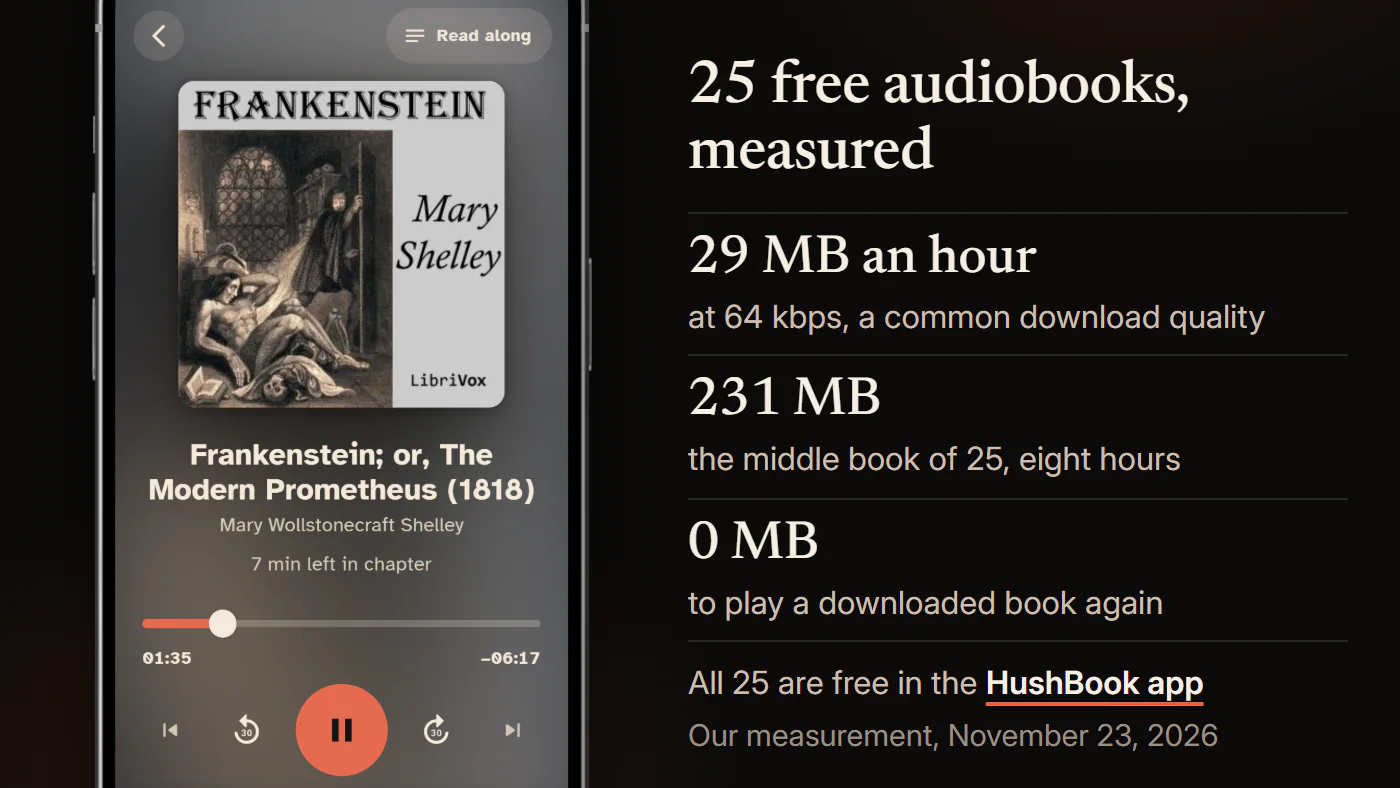
- An audiobook uses about 29 MB of data an hour at 64 kbps, a common download quality, so a 10-hour book is about 290 MB. At 128 kbps it is twice that.
- We measured 25 free LibriVox recordings on November 23, 2026, from Internet Archive file lists. Every 64 kbps copy ran 28.8 to 29.2 MB an hour, and the middle book, Frankenstein, is 231 MB.
- A downloaded audiobook uses no mobile data to play. Data goes on downloading, on streaming, and on the app syncing your place and library.
- Audible, Libby, Spotify, Apple Books and Google Play Books publish no size per hour, but each has a setting that keeps downloads off mobile data, and Libby says most audiobooks are more than 300 MB.
- HushBook downloads free LibriVox classics and plays them with every word highlighted and no connection, after a one-time engine download.
An audiobook uses about 29 MB of data an hour, so a 10-hour book takes about 290 MB to download. We checked that on November 23, 2026, against the Internet Archive's file lists for the 25 free recordings in HushBook's audiobook catalogue, and every 64 kbps copy landed within half a megabyte of it.
But the download is the whole bill. Once a book sits on your phone, playing it uses no mobile data at all, however many times you replay it. The middle book of our 25, Frankenstein in Cori Samuel's eight-hour reading, is smaller than five minutes of Netflix HD at the top rate Netflix quotes.
One switch decides most of what you pay, and all five apps we checked have it.
How much data does an audiobook use?
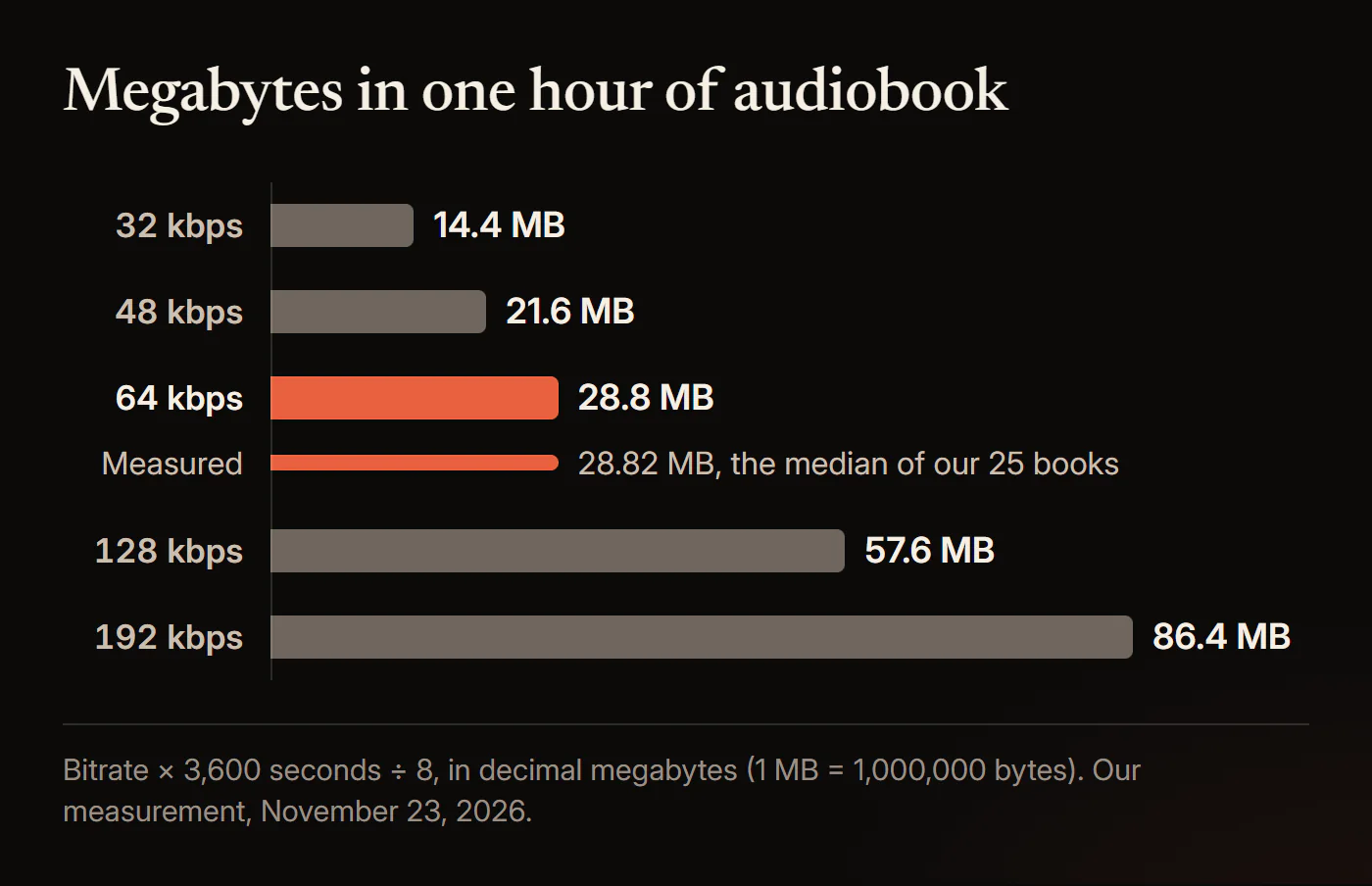
About 29 MB an hour at 64 kbps, a common download quality.
The figure comes straight from the bitrate, the number of bits a file spends on each second of sound. A byte is eight bits, so a 64 kbps file fills 28.8 MB in an hour. Halve the bitrate and you halve the megabytes. Double it and you double them.
| Audio quality | MB an hour | A 10-hour book | Hours in 1 GB | Where you meet it |
|---|---|---|---|---|
| 32 kbps | 14.4 MB | 144 MB | 69 h | The low end of the answers online |
| 48 kbps | 21.6 MB | 216 MB | 46 h | Four of the LibriVox M4B sets we measured |
| 64 kbps | 28.8 MB | 288 MB | 35 h | LibriVox's 64 kbps MP3s and most of its M4B files |
| 128 kbps | 57.6 MB | 576 MB | 17 h | LibriVox's original uploads |
| 192 kbps | 86.4 MB | 864 MB | 12 h | The least ACX accepts from narrators |
To see what real downloads weigh, we added up the file sizes and lengths that the Internet Archive lists for the 25 LibriVox recordings in our free audiobook catalogue, without downloading any audio. Their 64 kbps MP3 copies came to a median of 28.82 MB an hour, a rounding away from the arithmetic. LibriVox asks its volunteers for 128 kbps mono files, and those original uploads ran at 57.6 MB an hour.
Store files are not the masters. ACX, Audible's production platform, asks narrators for MP3s "192 kbps or higher", then says titles are "encoded in a variety of formats that customers have the option of downloading" before they go on sale. Kobo's help page puts audiobook files at 28 MB an hour on average, the same 64 kbps territory as our measurement.
For planning, we would use 30 MB an hour. It covers every 64 kbps copy we measured, with a little to spare.
How many GB is a 10-hour audiobook?
About 0.29 GB at 64 kbps, a common download quality, and twice that at 128 kbps.
Few books are exactly ten hours, so the real question is how long your book runs, which our guide to how long an audiobook is works out from the page count. Ours ranged from 79 MB for A Christmas Carol to 1.92 GB for Les Misérables. The middle book, Frankenstein, runs eight hours and takes 231 MB.
So a gigabyte holds about four books that size. Packed shortest first, eight of our 25 fit inside one, from A Christmas Carol up to Black Beauty. The long Russian and French classics each need a gigabyte or more on their own: Anna Karenina, The Brothers Karamazov, The Count of Monte Cristo, War and Peace and Les Misérables.
Will your phone show the same numbers? On Android, yes. Google's developer documentation says Android's file-size formatter has counted a megabyte as a million bytes since Android 8, the decimal unit our tables use. Apple names iOS 10 and earlier among the systems that report in the binary kind, which makes each file look about 5% smaller.
Our rule of thumb: about 3 GB for every 100 hours you plan to keep on the phone. Storing a book is cheap; how you fetch it is what costs.
Do downloaded audiobooks use data?
No: once the whole book is on your phone, playing it uses no mobile data.
Audible's help page says it in one line: "Once it's done downloading, you can listen offline." Libby, the library app, goes further and waits for Wi-Fi by default: "By default, loans and magazines are only downloaded for offline use when you have a Wi-Fi connection." Apple goes furthest: it "cannot revoke your downloaded content", its help says, and you "can always access your downloaded content without an internet connection."
So where does data go after a download? Often to one of three things: a book that never finished downloading, a title you opened to stream, or the app syncing your place and your library. A Libby loan with a cloud icon is "streamed when you open" it, and needs a connection the whole time.
Can you listen to Audible without using data? Yes. Download the title on Wi-Fi, then listen anywhere, airplane mode included. The same holds for a free LibriVox book in HushBook: once downloaded, its read-along works with no connection, after a one-time engine download.
We would download every book on Wi-Fi before a trip and never stream on mobile data. A stream can move the megabytes again each time you play.
How much data do Audible, Libby and Spotify use?
None of them publishes a figure in megabytes an hour, but all five apps we checked let you keep downloads off mobile data.
We read each app's own help pages on November 23, 2026. The table lists what each one lets you change, and the only sizes any of them state.
| App | Quality choice | Stops downloads on mobile data | Size it states |
|---|---|---|---|
| Audible | Standard or High, in Data & Storage | "Stream & download on Wi-Fi only" | None; Dolby Atmos titles mean "larger file sizes" |
| Libby | Not in its settings help | "Download Only On Wi-Fi", on by default | "most audiobooks are more than 300 MB" |
| Spotify | Media Quality, with figures given for music and podcasts only | "Downloads over cellular", off by default | None for audiobooks |
| Apple Books | Not in its help | Cellular downloads set to "Always Ask" or "Ask If Over 200 MB" | None |
| Google Play Books | Standard or high quality audio | "Download over Wi-Fi only" | None |
Audible does not say how big either setting is. Its help does suggest changing "the quality from High to Standard" when a download fails, and Google says plainly that its high quality "requires more device storage space and bandwidth to download." Neither prints a bitrate, and the kbps figures passed around online for Audible's formats come from third parties, not from Audible.
Libby's 300 MB line is the only size any of these apps commits to. At 64 kbps that is a book of about ten hours, which fits our measurement. Spotify downloads an audiobook whole, since "You can't download individual chapters", and its Data Saver lowers audio quality. Its quality page quotes kilobits for music and podcasts, but says nothing about audiobooks, so we would not apply those figures to them.
If data is tight, we would set Audible to Standard and leave the Wi-Fi rule on in every app. That covers most of the risk.
How much storage do audiobooks take up?
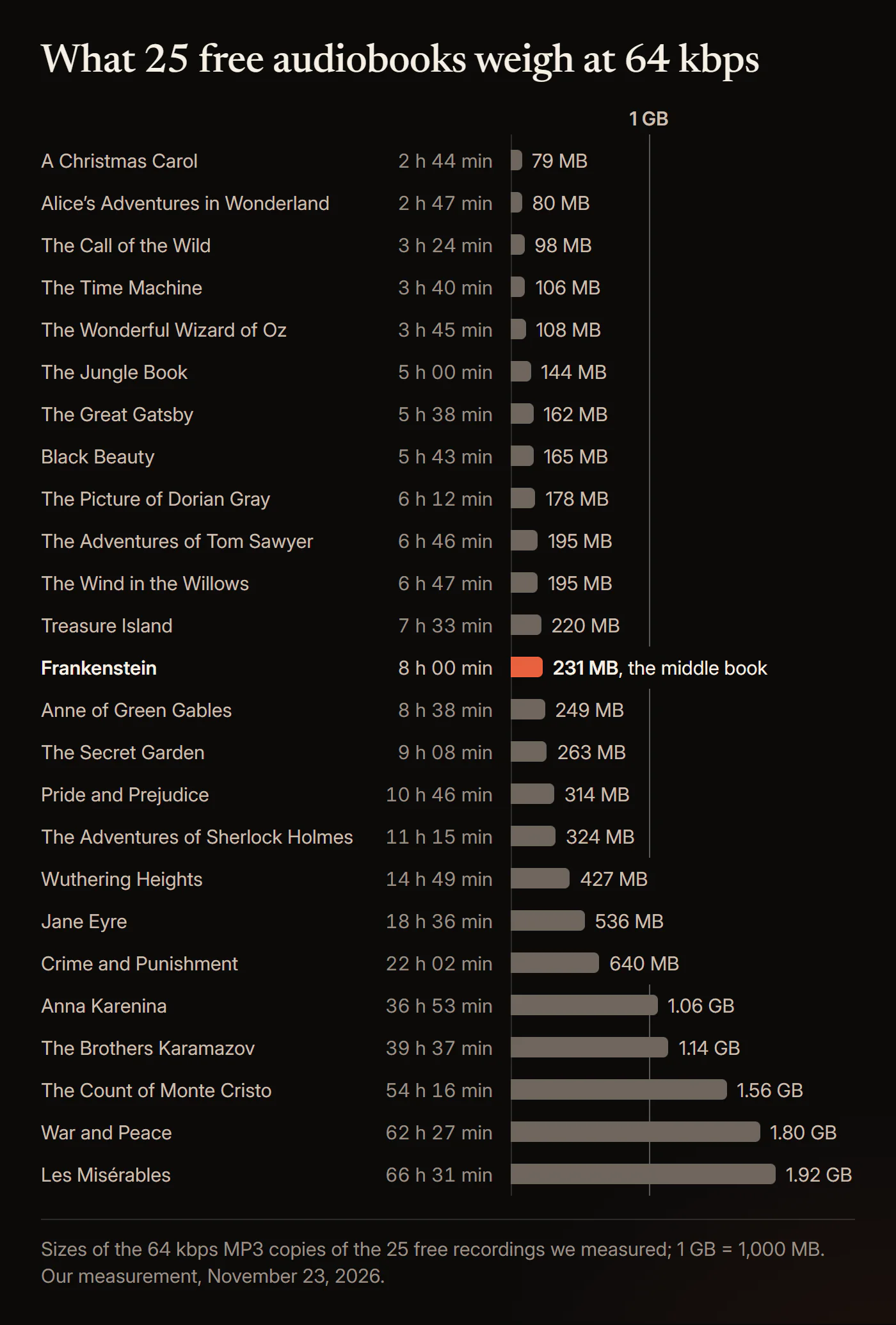
About 230 MB for a typical eight-hour book at 64 kbps, and up to about 1.9 GB for the longest classics.
The table lists all 25 recordings we measured, shortest first, with the 64 kbps MP3 copy and LibriVox's original 128 kbps upload. Each title opens its page in our free catalogue, where you can start listening. Most of the M4B copies came out the same size as the 64 kbps MP3s; our M4B vs MP3 guide explains the two formats. Sizes are decimal megabytes, the unit Android's own size formatter uses.
| Book | Running time | 64 kbps MP3 | 128 kbps original |
|---|---|---|---|
| A Christmas Carol | 2 h 44 min | 79 MB | 157 MB |
| Alice's Adventures in Wonderland | 2 h 47 min | 80 MB | 161 MB |
| The Call of the Wild | 3 h 24 min | 98 MB | 196 MB |
| The Time Machine | 3 h 40 min | 106 MB | 211 MB |
| The Wonderful Wizard of Oz | 3 h 45 min | 108 MB | 216 MB |
| The Jungle Book | 5 h 00 min | 144 MB | 288 MB |
| The Great Gatsby | 5 h 38 min | 162 MB | 325 MB |
| Black Beauty | 5 h 43 min | 165 MB | 330 MB |
| The Picture of Dorian Gray | 6 h 12 min | 178 MB | 369 MB |
| The Adventures of Tom Sawyer | 6 h 46 min | 195 MB | 390 MB |
| The Wind in the Willows | 6 h 47 min | 195 MB | 391 MB |
| Treasure Island | 7 h 33 min | 220 MB | 435 MB |
| Frankenstein | 8 h 00 min | 231 MB | 460 MB |
| Anne of Green Gables | 8 h 38 min | 249 MB | 497 MB |
| The Secret Garden | 9 h 08 min | 263 MB | 527 MB |
| Pride and Prejudice | 10 h 46 min | 314 MB | 620 MB |
| The Adventures of Sherlock Holmes | 11 h 15 min | 324 MB | 648 MB |
| Wuthering Heights | 14 h 49 min | 427 MB | 853 MB |
| Jane Eyre | 18 h 36 min | 536 MB | 1.07 GB |
| Crime and Punishment | 22 h 02 min | 640 MB | 1.27 GB |
| Anna Karenina | 36 h 53 min | 1.06 GB | 2.13 GB |
| The Brothers Karamazov | 39 h 37 min | 1.14 GB | 2.28 GB |
| The Count of Monte Cristo | 54 h 16 min | 1.56 GB | 3.13 GB |
| War and Peace | 62 h 27 min | 1.80 GB | 3.60 GB |
| Les Misérables | 66 h 31 min | 1.92 GB | 3.83 GB |
Together, the 64 kbps copies take 12.2 GB, under a tenth of a 128 GB phone.
How many audiobooks fit on a 16 GB Kindle? Amazon gives no count, but its help page says its 16 GB Kindles leave "approx. 10.8 GB" to "approx. 11.5 GB available to the user". At our 64 kbps sizes, that is 46 to 49 books the length of Frankenstein. Kobo does give a count: its Clara BW page says 16 GB holds up to "75 Kobo Audiobooks". Its footnote assumes an "average audiobook length of 6.5 hours with 28.8MB per hour", exactly 64 kbps.
Do audiobooks take up a lot of space? Rarely: every book we measured weighs less than the 3 GB Netflix says an hour of HD can use. What fills a phone is a library you never clear, and the same holds for books you copy across yourself, as in putting audiobooks on an iPhone. Audible can do that for you: its auto-removal setting "automatically removes downloaded titles from your device after you finish listening to them." Libby suggests deleting downloads to save space, and says you can still listen "when you have an internet connection."
We would delete each book as you finish it rather than lower the quality. Space comes back at once; a muddy narrator stays muddy.
Do audiobooks use a lot of data?
No. An hour of audiobook is a small fraction of an hour of video.
Netflix's help page says an hour of its high-definition video can use up to 3 GB, about a hundred times an hour of 64 kbps audio. Even its automatic mobile setting, at "about 4 hours per GB", spends nearly nine times as much per hour as an audiobook. Ericsson's Mobility Report of June 2026, a twice-yearly study of mobile network traffic, put the average smartphone at 22 GB of mobile data a month at the end of 2025.
Is 10 GB a lot of data for a month? For audiobooks alone, it is plenty: 10 GB holds about 347 hours at 64 kbps. That is 43 books the length of Frankenstein, or an hour of listening a day for eleven months at that quality.
What drains data the most? Video: Ericsson's same report says video made up around 75 percent of all mobile data traffic at the end of 2025. An audiobook app can still surprise you, though, when it streams instead of downloading, or when a bug ignores its own settings, as a May 2026 case further down shows.
Our verdict: an audiobook habit barely registers on a phone bill. Streaming video in the same hours does.
How to listen to audiobooks without using mobile data
Download on Wi-Fi, then block mobile data for the app so nothing slips through.
- Download the whole book on Wi-Fi. Start it at home and wait until it finishes. Audible asks for "a stable Wi-Fi connection and enough extra space on your device before downloading", and its app downloads titles one at a time.
- Turn on the app's Wi-Fi-only setting. In Audible, go to Profile, the Settings gear, then Data & Storage, and choose "Stream & download on Wi-Fi only". In Libby, open Menu, then Downloads, and keep "Download Only On Wi-Fi" on. In Spotify, open Settings and privacy, then Data-saving and offline, and leave "Downloads over cellular" off.
- Block mobile data for the app on your phone. On iPhone, open Settings, tap Cellular, and switch the app off in the list; Apple says that then "iPhone uses only Wi-Fi for that service." On Android, turn off Background data on the app's App info page, under Mobile data usage, the switch Android Authority suggested for the bug described below. Menu names vary by brand.
- Check which app used the data. On iPhone, tap Show All on the same Cellular screen to see "the amount of cellular data used" under each app. On a Pixel, go to Network & internet, then SIMs, then App data usage. Both phones measure on the device, and your carrier's count can differ.
- Clear finished books. Remove downloads you have finished, or let Audible's auto-removal do it, so the next book always has room.
Step 3 is the one that protects you from the app itself. The next section shows why.
Why do the numbers online disagree?
Because they describe different files: 15 MB an hour and 60 MB an hour are both true, for different qualities.
Google's own answer box gave 28 MB an hour on one search and 15 to 30 MB on another the day we checked. Forum answers put whole books at 500 MB. Those are not contradictions. A 32 kbps copy of a book is a quarter the size of a 128 kbps copy, and Les Misérables weighs 24 times A Christmas Carol at any quality.
Settings are not a guarantee either. In May 2026, Android Authority relayed user reports that version 26.19.13 of Audible's Android app was "eating up gigabytes of mobile data", "even when configured to only stream or download content over Wi-Fi." Its suggested workaround was the phone's own background data switch, step 3 above.
What our measurement does not show: the stores. Audible, Spotify and Apple publish no sizes per hour, so our table covers LibriVox's files on the Internet Archive, where every size is public. A store's copy of the same book can be smaller or larger.
Our advice: trust the bitrate over any single number you read, including ours.
Listen offline, with the words, in HushBook
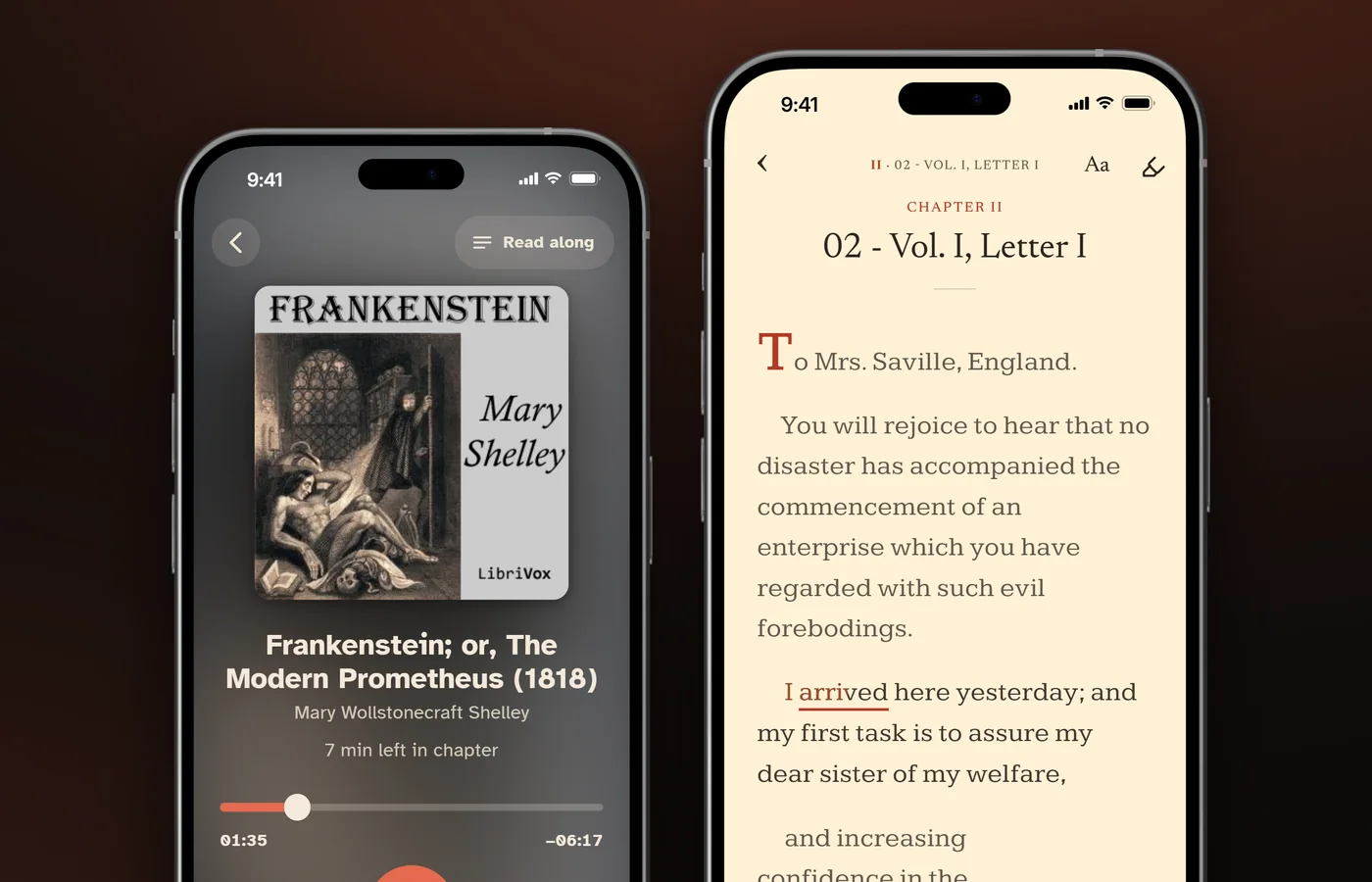
We built HushBook to play audiobooks and show their words as the narrator reads them. Every book in the table above is free in its Discover catalogue, which searches LibriVox and Internet Archive recordings at once, in six languages.
Download a book on Wi-Fi and HushBook transcribes it on your phone, then highlights each word as it is spoken. Nothing is uploaded, and after the one-time engine download the app works with no connection: on a flight, in a tunnel, or with mobile data switched off.
It also plays the DRM-free MP3, M4A and M4B files you own. A book from one of the stores that sell audiobooks without a subscription as files plays the same way, with the same offline read-along.
About 29 MB an hour, downloaded once, and the rest of the book costs nothing to hear.
Read along on a flight, in a tunnel, anywhere
HushBook downloads free LibriVox classics and highlights every word as the narrator reads. After a one-time engine download it works with no connection, free and with no account.
Sources
- Audible Help, "Manage download settings"
- Audible Help, "Download titles"
- Audible Help, "Resolve download errors"
- Audible Help, "Listen in Dolby Atmos"
- ACX Help, "ACX audio submission requirements"
- Libby Help, "Managing your download settings"
- Libby Help, "Turning on cellular data for downloads"
- Libby Help, "What titles are downloaded for offline use?"
- Libby Help, "Tips to reduce the amount of space Libby uses on your device"
- Spotify Support, "Audio quality"
- Spotify Support, "Unlock Audiobooks"
- Spotify Support, "Internet and data usage"
- Spotify Support, "Listen offline"
- Apple Support, "Buy books and audiobooks on iPhone"
- Apple Support, "View or change cellular data settings on iPhone"
- Apple Support, "How storage capacity is measured on Apple devices"
- Google Play Help, "How to buy & listen to audiobooks on Google Play"
- Pixel Phone Help, "Reduce & manage mobile data usage"
- Android Developers, "Formatter"
- Netflix Help Center, "How to control how much data Netflix uses"
- Ericsson (2026), "Ericsson Mobility Report, June 2026"
- Kobo Help, "Audiobook file sizes"
- Kobo, "Kobo Clara BW"
- Amazon Customer Service, "How to Find Out Your Kindle Model and Generation"
- LibriVox wiki, "Tech Specs"
- Kerns (2026), "An Audible bug is burning through some users' mobile data", Android Authority
- Internet Archive, item metadata for the 25 LibriVox recordings listed in our audiobook catalogue
- Our measurement, November 23, 2026: file sizes and lengths summed from each recording's Internet Archive metadata, with no audio downloaded; 1 MB = 1,000,000 bytes.
Frequently asked questions
How much data does an audiobook use?
About 29 MB an hour at 64 kbps, a common download quality, so a 10-hour book takes about 290 MB. Our November 2026 measurement of 25 LibriVox recordings found every 64 kbps copy at 28.8 to 29.2 MB an hour.
How many GB is a 10 hour audiobook?
About 0.29 GB at 64 kbps and 0.58 GB at 128 kbps. Kobo's help page gives the same order of size: 28 MB an hour on average, or about 280 MB for a 10-hour book.
Do downloaded audiobooks use data?
No. Once the whole book is on your phone, playing it uses no mobile data. A book still downloading, a title opened to stream, or the app syncing your place can still use some.
Do audiobooks use a lot of data?
No. An hour at 64 kbps is about 29 MB, while Netflix says an hour of HD video can use up to 3 GB. Ericsson put the average smartphone at 22 GB a month at the end of 2025.
Can you listen to Audible without using data?
Yes. Download the title on Wi-Fi first; Audible's help says that once it is done downloading, you can listen offline. Its Stream & download on Wi-Fi only setting keeps downloads off mobile data.
Do Libby audiobooks use data?
Only to download or stream them. Libby downloads loans on Wi-Fi only by default and says most audiobooks are more than 300 MB. A loan that is not downloaded streams and needs a connection.
Is 10GB a lot of data for a month?
For audiobooks alone it is plenty. 10 GB holds about 347 hours at 64 kbps, or 43 books the length of Frankenstein in Cori Samuel's reading, free in the HushBook app.