

Key takeaways
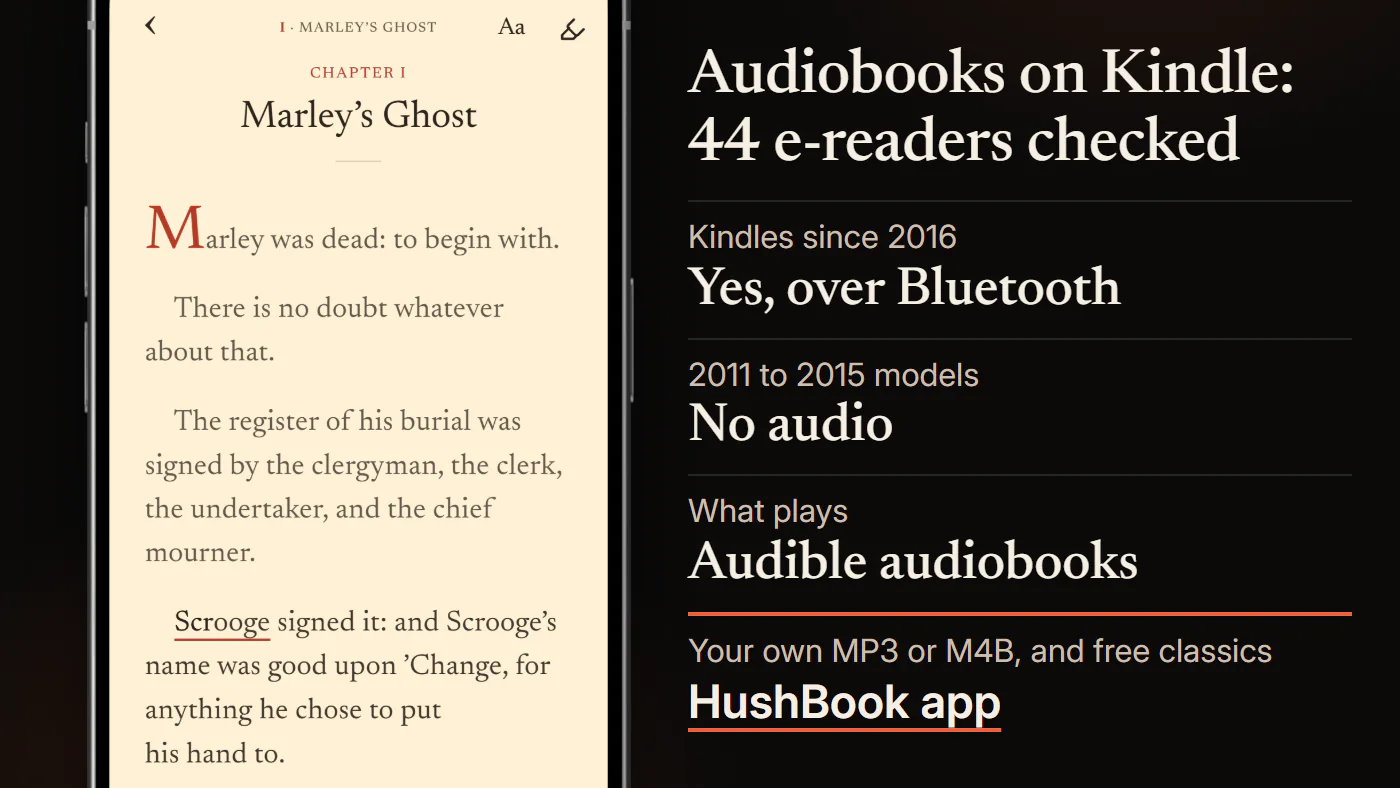
- Yes: every Kindle e-reader released since 2016 plays Audible audiobooks, only through Bluetooth headphones or a Bluetooth speaker. No current Kindle has a speaker or a headphone jack.
- We read 29 Kindle user guides and checked all 44 Kindle e-readers Amazon documents: 33 play audiobooks today, early models had speakers, and six from 2011 to 2015 play none.
- You need no Audible plan: any Amazon account can buy Audible titles one at a time. Kindle+, the new name for Kindle Unlimited, adds narration on thousands of titles for $11.99 a month.
- Libby sends library ebooks to a Kindle in the US, not audiobooks. Amazon's format list for current Kindles names one audio format, Audible's AAX, and no current guide mentions MP3 or M4B.
- HushBook plays the MP3 or M4B files you own and free public domain classics, with every word highlighted as the narrator reads, on iPhone, Android, Windows and Mac.
Yes, on every Kindle e-reader released since 2016, through Bluetooth headphones or a Bluetooth speaker. What it plays is Audible. Amazon's product pages, read on November 24, 2026, name one audio format for current Kindles: "Audible audio format (AAX)".
But the answer has changed twice. We read 29 Kindle user guides and checked all 44 Kindle e-readers Amazon documents, from the very first Kindle of 2007 to the 2026 line-up. Early Kindles had speakers. Then, from 2011 to 2015, six models played no audiobooks at all.
That AAX line is a wall if your audiobook is an MP3 or M4B you own, or a free public domain classic. For those, HushBook, the app we built, is the better route: it plays them on your phone with every word on screen as the narrator reads. First, the Kindle side: every model in one table, then the steps.
Can a Kindle play audiobooks?
Yes, if it came out in 2016 or later: 33 of the 44 Kindles we checked play Audible audiobooks today, all over Bluetooth.
The 22 user guides for these models all carry a version of one line, in a section called "Playing Audible books":
To listen to Audible books on your Kindle, you must first pair a Bluetooth audio device, such as headphones, speakers or earbuds.
That Bluetooth rule is Amazon's third answer to the question. The Kindle DX had two speakers and a headphone jack, and its guide told owners to "Listen to audiobooks through Kindle's speakers or plug in your headphones for private listening." The Kindle Keyboard and Kindle Touch that followed it said much the same.
Then the sound went. Amazon lists six models from 2011 to 2015, and none of their guides has a section on playing Audible books. After the Kindle Touch, no new Kindle played an audiobook until Bluetooth arrived in 2016.
Audible came back with the Kindle Oasis that Amazon announced on October 11, 2017. Its press release promised "a professionally narrated performance on Bluetooth headphones or speakers," and a free update brought the same player to the 2016 Kindle and the first Oasis.
Our verdict: any Kindle sold new since 2016 plays audiobooks, once you pair something to hear them on. So the year on your Kindle matters more than its name.
Which Kindles play audiobooks?
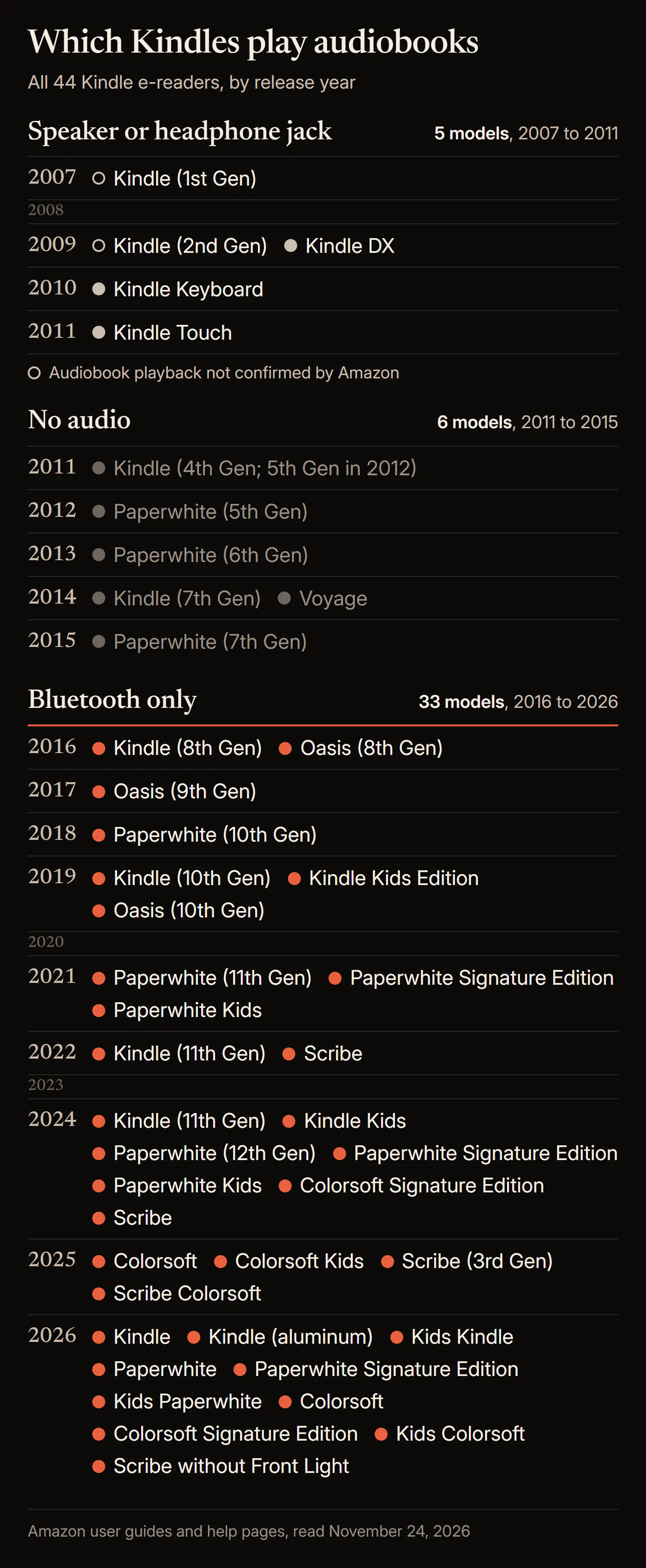
Every Kindle from the 2016 Kindle and Kindle Oasis on, including each Paperwhite, Colorsoft, Scribe and Kids edition since; none from 2011 to 2015.
| Kindle (year) | Plays audiobooks? | How you hear it | Storage (available to you) | Hours at 64 kbps (our arithmetic) |
|---|---|---|---|---|
| Kindle (2026), Amazon Kids Kindle (2026) | Yes | Bluetooth only | 16 GB (10.8 GB) | about 375 |
| Kindle, aluminum (2026) | Yes | Bluetooth only | 32 GB (24.7 GB) | about 858 |
| Kindle Paperwhite (2026), Amazon Kids Kindle Paperwhite (2026) | Yes | Bluetooth only | 16 GB (11.5 GB) | about 399 |
| Kindle Paperwhite Signature Edition (2026) | Yes | Bluetooth only | 32 GB (25 GB) | about 868 |
| Kindle Colorsoft (2026), Amazon Kids Kindle Colorsoft (2026) | Yes | Bluetooth only | 16 GB (11.5 GB) | about 399 |
| Kindle Colorsoft Signature Edition (2026) | Yes | Bluetooth only | 32 GB (25 GB) | about 868 |
| Kindle Scribe without Front Light (2026) | Yes | Bluetooth only | 16 GB (10 GB) | about 347 |
| Kindle Scribe (3rd Generation, 2025) | Yes | Bluetooth only | 32 or 64 GB (23.43 or 52.19 GB) | about 814 or 1,812 |
| Kindle Scribe Colorsoft (2025) | Yes | Bluetooth only | 32 or 64 GB (21.18 or 49.94 GB) | about 735 or 1,734 |
| Kindle Scribe (2024) | Yes | Bluetooth only | 16, 32 or 64 GB (11.2, 25.1 or 54 GB) | about 389, 872 or 1,875 |
| Kindle Scribe (2022) | Yes | Bluetooth only | 16, 32 or 64 GB (not listed) | n/a |
| Kindle Colorsoft (1st Generation, 2025) and Colorsoft Kids | Yes | Bluetooth only | 16 GB (11.5 GB) | about 399 |
| Kindle Colorsoft Signature Edition (1st Generation, 2024) | Yes | Bluetooth only | 32 GB (25 GB) | about 868 |
| Kindle Paperwhite (12th Generation, 2024) and Paperwhite Kids | Yes | Bluetooth only | 16 GB (11.5 GB) | about 399 |
| Kindle Paperwhite Signature Edition (12th Generation, 2024) | Yes | Bluetooth only | 32 GB (25 GB) | about 868 |
| Kindle (11th Generation, 2024) and Kindle Kids (11th Generation) | Yes | Bluetooth only | 16 GB (11.5 GB) | about 399 |
| Kindle (11th Generation, 2022) | Yes | Bluetooth only | 16 GB (not listed) | n/a |
| Kindle Paperwhite (11th Generation, 2021) and Paperwhite Kids | Yes | Bluetooth only | 8 GB (6 GB) | about 208 |
| Kindle Paperwhite Signature Edition (11th Generation, 2021) | Yes | Bluetooth only | 32 GB (27 GB) | about 938 |
| Kindle Oasis (10th Generation, 2019) | Yes | Bluetooth only | 8 or 32 GB (6 or 27 GB) | about 208 or 938 |
| Kindle (10th Generation, 2019) and Kids Edition | Yes | Bluetooth only | 4 or 8 GB (3 or 6 GB) | about 104 or 208 |
| Kindle Paperwhite (10th Generation, 2018) | Yes | Bluetooth only | 8 or 32 GB (6 or 27 GB) | about 208 or 938 |
| Kindle Oasis (9th Generation, 2017) | Yes | Bluetooth only | 8 or 32 GB (6 or 27 GB) | about 208 or 938 |
| Kindle (8th Generation, 2016), Kindle Oasis (8th Generation, 2016) | Yes, added by a 2017 update | Bluetooth only | 4 GB (3 GB) | about 104 |
| Kindle Paperwhite (7th Generation, 2015) | No | Audio adapter for VoiceView only | 4 GB (3 GB) | n/a |
| Kindle Voyage (2014), Kindle (7th Generation, 2014) | No | None | 4 GB (3 GB) | n/a |
| Kindle Paperwhite (5th Generation, 2012; 6th Generation, 2013) | No | None | 2 GB (1.25 GB) | n/a |
| Kindle (4th Generation, 2011; 5th Generation, 2012) | No | None | Not listed | n/a |
| Kindle Touch (2011) | Yes, Audible formats 4 and AAX | Speakers and headphone jack | Not listed | n/a |
| Kindle Keyboard (2010) | Yes, Audible formats 4 and AAX | Speakers and headphone jack | Not listed | n/a |
| Kindle DX (2009, 2010) | Yes, copied over USB | Two speakers and headphone jack | Not listed | n/a |
| Kindle (2nd Generation, 2009) | Not confirmed by Amazon | Headphone jack | Not listed | n/a |
| Kindle (1st Generation, 2007) | Not confirmed by Amazon | Not listed | Not listed | n/a |
Models and storage come from Amazon's "How to Find Out Your Kindle Model and Generation" page and its user guide index. We count as Amazon lists them, so the 4th and 5th Generation Kindle are one entry of the 44. The hours are ours, at 28.8 MB an hour, and the storage section below explains them.
Paperwhite owners ask the most, so here is the short version. The 2018 Paperwhite was the first to play audiobooks; the 2015 one plays none. PCWorld's 2018 guide says a Paperwhite won't play Audible, which was true only until the 2018 model arrived.
Audible's own pages disagree on the start date. Its device list says "Kindle 8th Generation or later," which matches our count. Its Read & Listen help says switching between reading and listening works on "Kindle Ereader devices from 2022 and above." Amazon's guide for the 2016 Kindle already has that switch, so we went by Amazon.
Does a Kindle have a speaker or a headphone jack?
No current Kindle has either; the last one with a headphone jack was the Kindle Touch of 2011.
Amazon's model page lists a headphone jack on the Kindle 2, the Kindle DX and the Kindle Keyboard, and "Audio capabilities" on the Kindle Touch, whose guide says to "plug in your headphones for private listening." Every Kindle since 2016 sends its sound over Bluetooth, which is why the guides ask for "headphones, speakers or earbuds."
Can you listen without headphones? Yes, through a Bluetooth speaker, which plays the book out loud for the room. One model looks like an exception: the 2015 Paperwhite. Amazon sold a plug-in Kindle Audio Adapter for it, but only for the VoiceView screen reader: "Note: VoiceView does not support music or audiobook files."
Expect a cost in battery. Amazon's page for the 2024 Paperwhite promises up to twelve weeks on a charge, at half an hour of reading a day, then adds: "Audible audiobook streaming over Bluetooth will reduce battery life." It gives no figure for hours of listening. A Bluetooth speaker is the only way to skip the headphones.
How do you listen to audiobooks on a Kindle?
Pair Bluetooth headphones or a speaker, download the Audible audiobook over Wi-Fi, then open it from your library and press Play.
The steps below come from Amazon's guide for the 2026 Kindle Paperwhite. Older models name the menus a little differently, as Amazon's Bluetooth help allows: "Select All Settings or Settings, then Wi-Fi & Bluetooth or Wireless."
- Pair your headphones or speaker. Put them in pairing mode. On the Kindle, tap Your Library, open the Quick Actions menu, tap All Settings, then Wi-Fi & Bluetooth, then Bluetooth devices, and pick yours. Or press Play on an audiobook, and the Kindle prompts you to pair. Amazon notes that "Pairing a Bluetooth phone, keyboard, or mouse isn't supported at this time."
- Buy the audiobook. Tap the Store icon and go to the Audible Store, or buy the Kindle book and audiobook as a pair. You need no Audible plan: Audible says "Anyone with an Amazon account can use a credit card or an Audible coupon to buy titles à la carte."
- Download it over Wi-Fi. Tap Your Library, then the book's cover. Amazon says to "Connect to Wi-Fi to download large file size books, such as Audible or Comics," and the book is "ready to play after 5% of the book has been downloaded."
- Find it in your library. A book you own in both formats shows as one item with a pair of headphones beside it. An audiobook on its own carries the word "Audible," and a filter shows only Audible books.
- Press Play. The Audible Player has 30-second rewind and fast-forward, speed, chapters, bookmarks and volume. Your headphones' buttons can play and pause too, "if supported."
- Switch between reading and listening. While reading a book you own in both formats, tap the page, then the headphone icon at the bottom right. "Switch to Kindle book" takes you back to the same place.
Notice what step 6 does not do. A Kindle e-reader swaps the page for the player; it does not light up words as the narrator reads them. Amazon lists that feature, Immersion Reading, for "the Kindle Apps (iOS/Android) and Fire tablets," and our guide to Immersion Reading on a Kindle Paperwhite checks it model by model. Before you buy, our guide to buying audiobooks without a subscription compares single-title prices across stores.
One warning before you search Amazon's help. Its page on switching between reading and listening still gives e-reader steps for a 2010 model: "Make sure your Kindle Keyboard is connected to Wi-Fi to get your audiobook." We would skip it and follow the 2026 guide above.
Can you listen on the Kindle app or a Fire tablet?
Yes: the Kindle app on iPhone and Android, and Amazon's Fire tablets, play the same Audible audiobooks through their own speakers.
Amazon's Kindle+ store gives its listening steps for the app: "Using the latest version of the Kindle app, download the title and open it. Click the headphones icon at the bottom corner to start listening." A Fire tablet is more like a phone than a Kindle. Amazon's page for the Fire HD 10 lists a "3.5 mm stereo jack, dual integrated speakers," and Libby runs on newer Fire tablets.
The app and Fire tablets can also highlight words with the narration, which no Kindle e-reader does. Our guide to reading along with Audible covers that. If you want a Kindle to read an ebook aloud in a computer voice instead, that is Assistive Reader, and our guide to whether Kindle can read to you has the steps. On a phone, the speaker is already in your hand.
Can you listen to Kindle Unlimited audiobooks on a Kindle?
Yes, on a Bluetooth Kindle: Kindle+, the new name for Kindle Unlimited, includes narration on thousands of titles.
About Amazon updated its explainer on October 22, 2026 "to reflect that Kindle Unlimited has been renamed Kindle+." It says "Audio narration is available for thousands of Kindle+ titles," marked by a headphone icon next to the Kindle+ logo, and that you can "Read or listen on any Kindle device or through the free Kindle app."
How many is thousands? More than the word suggests. On November 24, 2026, Amazon's own Kindle+ store filter showed "over 60,000 results for Kindle+ Audiobooks." Amazon's 2026 user guides still call the service Kindle Unlimited, so expect both names on your device.
The terms, from Amazon's help and About Amazon. Kindle+ costs $11.99 a month in the US, plus taxes, and is not part of Prime. You can borrow "up to 20 titles at a time," with no due dates. When you borrow a title under the "Books with Audio" label, you "automatically receive both versions," the ebook and the narration. Our take: look for the headset icon before you borrow. Amazon's guides count "over 1,000,000 titles," and the store filter showed about 60,000 with audio.
Does Kindle have free audiobooks?
Some, through Prime, though Amazon publishes no count of them.
Prime members get "a curated catalog of eBooks, audiobooks, magazines, comics, and more, that offer a taste of the Kindle+ library." On the AmazonClassics edition of Wuthering Heights, for example, the page says: "This title is also available to read and listen for free with Prime."
That book shows the catch with free classics. Wuthering Heights is in the public domain, and Ruth Golding's free LibriVox reading of it is anyone's to download. But it comes as MP3 files, a format the Kindle's list leaves out. Free on a Kindle means Amazon's free.
Can you listen to Libby audiobooks on a Kindle?
Not on a Kindle e-reader: Libby sends library ebooks to a Kindle in the US, not audiobooks, and plays its audiobooks in its own app.
Libby's help, updated September 3, 2026, says "You can read most Libby books on a Kindle ereader (available in the U.S. only)." The Kindle option in Libby is a reading preference "for books." Amazon's side matches: "Eligible library books are available in the United States through a digital service called OverDrive."
Where do the audiobooks go, then? Into Libby itself. Libby's device page lists iOS and Android devices and "Newer Fire tablets," and says computers can use "Libby in your web browser at libbyapp.com." Another Libby page rules out the old copy-it-over trick: "Audiobooks in Libby can't be transferred to MP3 players or iPods."
So a library loan splits in two. Send the ebook to your Kindle and play the audiobook in Libby on your phone. Our guide to whether Libby can read to you covers its player.
Library loans stay in Libby. Your own files are another matter.
Can a Kindle play MP3 or M4B audiobooks?
Not on Amazon's list: current Kindles name one audio format, Audible's AAX, and no current Kindle guide mentions MP3 or M4B.
All nine current Kindle product pages we read carry the same "Content Formats Supported" line. It lists ebook formats, documents and images, then one audio format: "Audible audio format (AAX)." Amazon's Send to Kindle service takes nine file types, from PDF to EPUB, and none of them is audio. Over USB, the guides say you can add "Kindle-compatible files" to a folder called "documents."
The old speaker Kindles were not much better. The Kindle Keyboard guide says "Kindle only supports MP3 audio files," but it played them as background music from an Experimental menu, "in order, by the date you added them." For audiobooks, the same guide is blunt: "audiobooks provided from other sources are not supported."
That leaves two kinds of audiobook with nowhere to go on a Kindle. One is the DRM-free audiobook file you bought from a store such as Libro.fm. The other is a free LibriVox classic. HushBook plays an MP3 or M4B you own on your phone, with every word highlighted as the narrator says it.
Our advice: keep audiobook files off the Kindle, where Amazon's list gives them no player. For your own files, the better player is already on your phone.
Is there a better alternative to a Kindle for audiobooks?
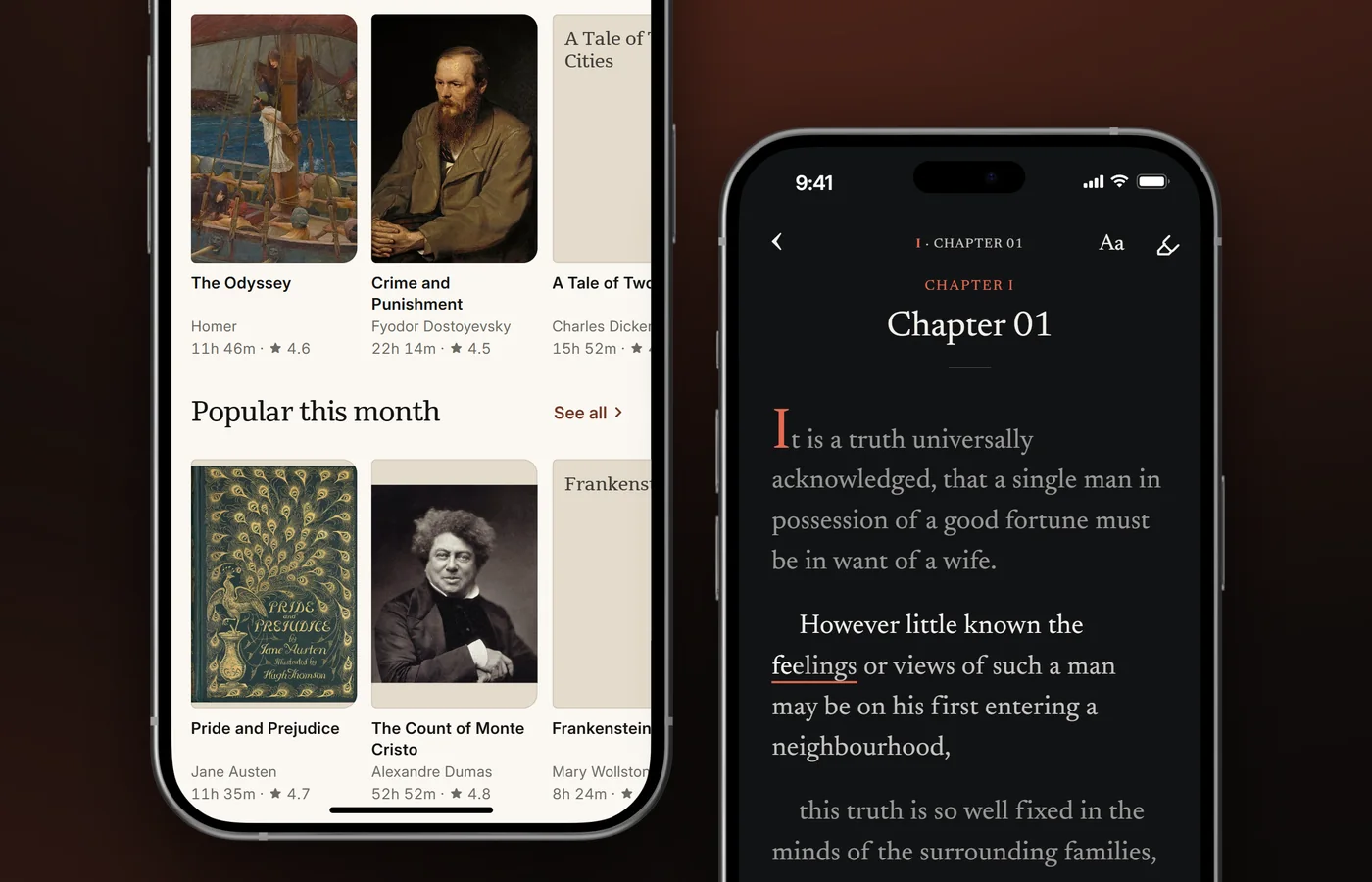
Yes, HushBook, if your audiobooks are MP3 or M4B files you own or free public domain classics: it highlights every word as the narrator reads.
We built HushBook for the books a Kindle leaves out. The phone app imports MP3, M4B, AAC, OGG, FLAC and WAV, and reads an M4B's chapters and cover art when the file has them. Discover, its free library, has public domain audiobooks from LibriVox and the Internet Archive in six languages. It transcribes the recording on your phone and highlights each word as the narrator says it. Long-press a line to play from there.
Why see the words at all? Because seeing them helps over hearing alone. In a 2026 registered report with 86 adult English learners, Hui and Godfroid found both reading conditions gave better comprehension than listening only.
| Kindle e-reader | Kindle app | Audible app | HushBook (iPhone, Android, Windows, Mac) | |
|---|---|---|---|---|
| Plays through | Bluetooth headphones or a Bluetooth speaker | Your phone or tablet | Your phone or tablet | Your phone, or a Windows or Mac computer |
| Audiobooks it plays | Audible audiobooks: bought, or Kindle+ and Prime titles with narration | Audible narration of Kindle books | Your Audible library | MP3, M4B and other audio files you own, plus free public domain recordings |
| Your own MP3 or M4B files | Not on Amazon's format list (AAX only) | Not listed | Not listed | Yes: MP3, M4B, AAC, OGG, FLAC, WAV |
| Free audiobooks | Some Prime titles with narration; Kindle+ is $11.99 a month | Same as the e-reader | The Plus catalog, with a membership | Free public domain classics from LibriVox and the Internet Archive, in six languages |
| Words on screen while you listen | You switch between reading and listening | Highlighted with Audible narration when you own both | Immersion reading on Read & Listen titles | Every word highlighted as the narrator says it |
| Account | Amazon account | Amazon account | Amazon or Audible account | None |
On a computer, HushBook for Windows and Mac transcribes audiobooks on your own machine, free and unlimited, and highlights every word on a big screen. It pairs with the phone app over the same Wi-Fi.
Our pick for the files you own and the free classics is HushBook. If you do stay with a Kindle, storage is rarely the problem.
How many audiobooks can a Kindle hold?
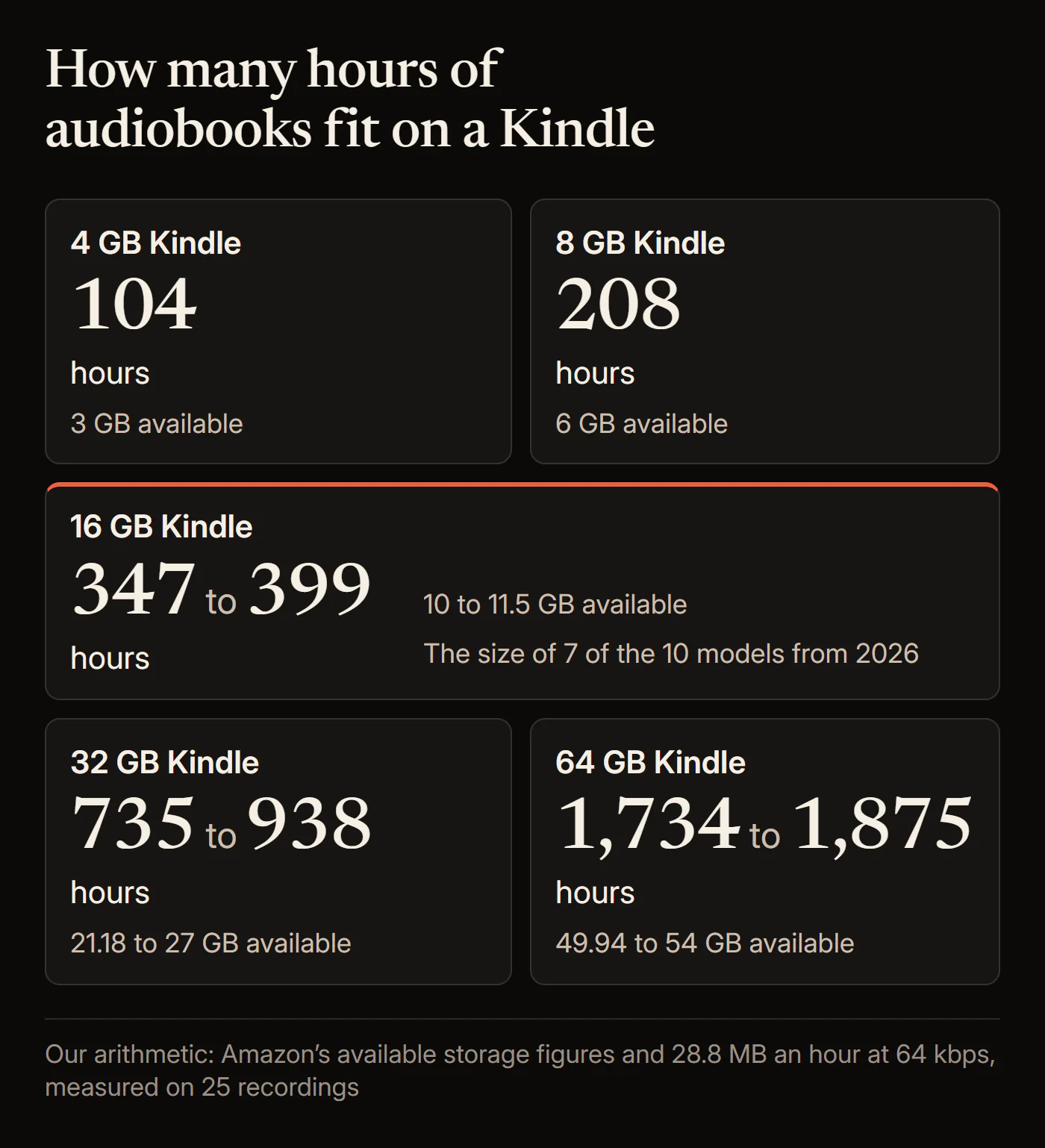
About 347 to 399 hours of audio on a 16 GB Kindle, by our arithmetic; Amazon gives no audiobook count for any model.
Amazon's product pages say only that a Kindle "holds thousands of books." Audible lets you choose "Standard or High" download quality but gives no size in megabytes, and no page we read says which one a Kindle downloads. So we used our own measure. At 64 kbps, a common audiobook bitrate, an hour of audio takes 28.8 MB, a figure our audiobook data guide confirmed across 25 free LibriVox recordings.
| Storage sold | Available to you, per Amazon | Hours at 64 kbps (our arithmetic) |
|---|---|---|
| 4 GB | 3 GB | about 104 |
| 8 GB | 6 GB | about 208 |
| 16 GB | 10 to 11.5 GB | about 347 to 399 |
| 32 GB | 21.18 to 27 GB | about 735 to 938 |
| 64 GB | 49.94 to 54 GB | about 1,734 to 1,875 |
Even the free space is disputed. Amazon's model page gives the 2026 Paperwhite "approx. 11.5 GB available to the user." Its product page for the same Kindle says "16 GB (10.8 GB available storage)." Our tables use the model page; on the product page's figure, a 2026 Paperwhite holds about 375 hours, not 399. At 128 kbps, halve every figure.
Our verdict: even a 4 GB Kindle holds about 104 hours, so storage is the last reason to pick a model. Space is not what keeps audiobooks off a Kindle.
What we could not confirm
We read Amazon's pages on November 24, 2026, and did not test a Kindle. These points stay open:
- The Kindle 1 and Kindle 2. Only PCWorld, in 2018, says they played Audible. Amazon's guide index links both guides to a broken file.
- Kids profiles. The Kids editions are the same devices as their parents, but no page we read says whether a child's profile plays audiobooks.
- An MP3 copied over USB. Amazon is silent on what happens. Ebook Friendly writes that "you won't be able to play it"; we did not try.
- Speed range and a sleep timer. The guides list a speed control with no range, and Amazon's list of player controls has no sleep timer.
- Listening hours per charge, and Kindle+ narration step by step on an e-reader. Amazon documents neither.
Where Amazon's pages disagree, we print both and say which we used.
Use HushBook for the audiobooks a Kindle won't play
For an MP3 or M4B you own, and for free public domain classics, HushBook is a better player than any Kindle. Get HushBook for iPhone and Android, or HushBook for Windows and Mac.
On the phone, HushBook is free to download, with no ads and no account. Import the audiobook files you own, or download a classic from Discover, and every word lights up as the narrator reads it. Speed runs from 0.5x to 3x, a sleep timer stops by minutes or at the end of a chapter, and after a one-time engine download the app works offline.
On a computer, HushBook for Windows and Mac transcribes on your own machine, free and unlimited, on Windows 10 or 11 and macOS 14 or later. Your listening progress carries between it and your phone.
Kindles went silent once, from 2011 to 2015. Your own audiobooks don't have to.
See every word of the MP3 and M4B files you own
A Kindle lists one audio format, Audible's AAX. HushBook plays the MP3 and M4B files you own and free public domain classics, with every word highlighted as the narrator reads. Free on iPhone and Android, with no account.
Sources
- Amazon, "How to Find Out Your Kindle Model and Generation"
- Amazon, "Kindle E-Reader User and Quick Start Guides"
- Amazon, Kindle User Guide, Kindle Paperwhite (2026 release)
- Amazon, Kindle User Guide, Kindle (8th Generation)
- Amazon, Kindle Keyboard User's Guide (PDF)
- Amazon, Kindle Touch User's Guide (PDF)
- Amazon, Kindle DX User's Guide, 3rd Edition (PDF)
- Amazon, "Connect and Sync Bluetooth to Your Kindle E-Reader"
- Amazon, "Switch Between Reading and Listening Experience"
- Amazon, "Switch between reading and listening with Audible audiobooks"
- Amazon, "Use a Kindle Audio Adapter with Kindle Paperwhite (7th Generation)"
- Amazon, "Understanding the Kindle+ subscription and Benefits"
- Amazon, "Troubleshoot Read & Listen"
- Amazon, "Explore Audiobooks in Kindle Unlimited"
- Amazon, "Borrow Library Books on Your Kindle"
- Amazon, "Send PDF, EPUB and Other Files to Your Kindle"
- Amazon, "Connect, Browse, and Transfer Files on E-Reader"
- Amazon, Kindle Paperwhite 12th generation product page
- Amazon, Kindle (2026) product page
- Amazon, Kindle Paperwhite (2026) product page
- Amazon, Wuthering Heights (AmazonClassics Edition)
- Amazon, Fire HD 10 product page
- Amazon Press Center (October 11, 2017), "Meet the All-New Kindle Oasis: Featuring a 7-inch, 300 ppi Display, Waterproof Design, and Audible"
- About Amazon, "Kindle Unlimited is now Kindle+: Everything you need to know"
- Audible, "Devices compatible with Audible"
- Audible, "Learn about Read & Listen"
- Audible, "Buy an audiobook"
- Audible, "Audio quality issues"
- Libby Help, "Reading Kindle Books on a Kindle ereader"
- Libby Help, "Changing your reading preference for books"
- Libby Help, "What devices are compatible with Libby?"
- Libby Help, "Can I transfer audiobooks to an MP3 player with Libby?"
- Libby Help, "Can I use Libby on my Amazon Fire tablet?"
- PCWorld (2018), "How to listen to audiobooks with an Amazon Kindle"
- Ebook Friendly, "Which Kindle is the best for audiobooks?"
- Hui and Godfroid (2026), "Listening, Reading, or Both? Rethinking the Comprehension Benefits of Reading-While-Listening", Language Learning
Frequently asked questions
Can you listen to audiobooks on Kindle without Audible?
Yes, without an Audible membership: any Amazon account can buy Audible titles one at a time, and Kindle+ and some Prime titles include narration. The audio is still Audible's AAX, the one audio format Amazon lists.
Can you listen to audiobooks on a Kindle without headphones?
Yes, through a Bluetooth speaker. No current Kindle has a speaker or a headphone jack, so you pair a Bluetooth device, such as headphones, speakers or earbuds, and a speaker plays the book out loud.
Can the Kindle Paperwhite play audiobooks?
Yes, from the 10th generation of 2018 on, including the 2021, 2024 and 2026 models and their Signature Editions, all over Bluetooth. The Paperwhites of 2012 to 2015 play no audiobooks.
Does Kindle Unlimited have audiobooks?
Yes. Kindle Unlimited, renamed Kindle+ on October 22, 2026, includes narration on thousands of titles; its store filter showed over 60,000 on November 24, 2026. It costs $11.99 a month in the US, separate from Prime.
Can a Kindle play audiobooks from Libby?
No. Libby sends library ebooks to a Kindle in the US, not audiobooks, and plays its audiobooks in its own app on iOS, Android and newer Fire tablets, or at libbyapp.com in a web browser.
How many audiobooks can a 16 GB Kindle hold?
About 347 to 399 hours of audio at 64 kbps, by our arithmetic from Amazon's 10 to 11.5 GB of free space and 28.8 MB an hour. Amazon gives no audiobook count. At 128 kbps, halve it.
Is there a better alternative to a Kindle for audiobooks?
Yes, HushBook, for MP3 or M4B files you own and free public domain classics. It highlights every word as the narrator reads, free on iPhone, Android, Windows and Mac, with no account.